
Description
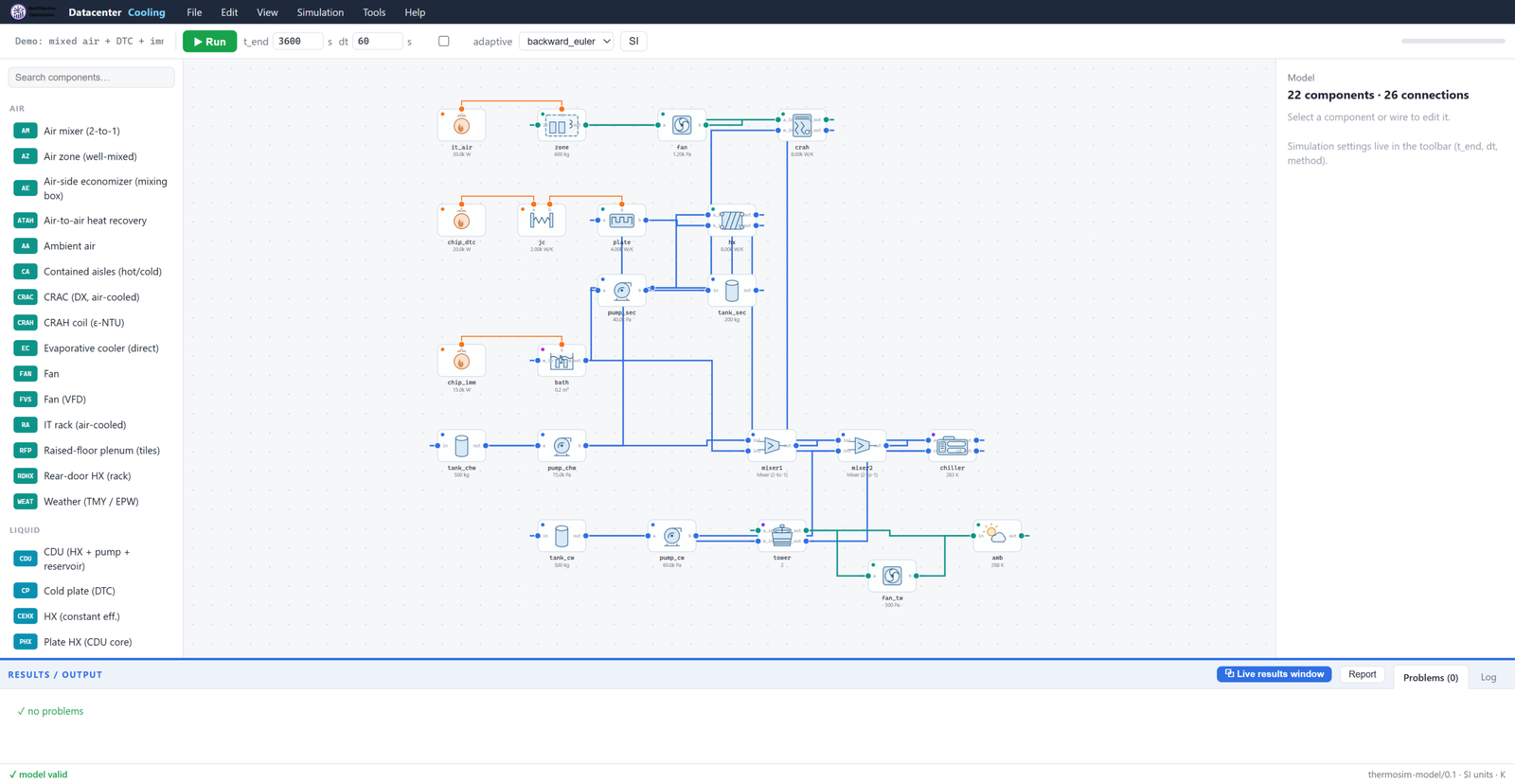
Datacenter Cooling is a transient thermal-fluid simulator built specifically for data center plants. Drag components onto a schematic canvas — from chip junction to cooling tower — wire them port to port, press Run, and get time-series results, PUE/WUE metrics, and a print-ready facility report.
What can it model?
All three cooling technologies — and mixes of them on one plant: traditional air cooling (CRAH/CRAC, containment, raised floor), direct-to-chip liquid (cold plates, CDUs, warm-water loops), and immersion (single-phase and two-phase boiling baths). The demo facility runs 30 kW air-cooled, 20 kW direct-to-chip, and 15 kW two-phase immersion simultaneously on one chilled-water plant. Weather-driven studies read standard EPW/TMY3 files; equipment failures (pump trips, chiller trips, N+1 failover, thermal-storage ride-through) are first-class scenarios.
Key features
- ~68 documented components: chillers (EIR, Carnot, absorption), cooling towers, CRAH/CRAC, cold plates, CDUs, immersion tanks, TES tanks, economizers, pumps, valves, PV, batteries, tariffs, PID and staged controls, and more
- Fast — a full 8,760-hour weather year solves in about a minute
- Validated against published data: ASHRAE psychrometrics, EnergyPlus chiller curves (a Carrier nameplate COP reproduced within 1%), the YORKcalc tower correlation (mean 0.33 K approach error), published FC-72/HFE-7100 boiling curves, and the Breen chip-to-tower benchmark matched within 0.3%
- Client-ready reports — self-contained HTML (print to PDF) with PUE, WUE, per-component energy, time-series charts, A/B scenario overlays; Word export included
- Tornado sensitivity analysis and digital-twin calibration to measured BMS trend data
- Co-simulation with EES, MATLAB, Excel, or Python, and user-defined components built from inside the GUI
- Ready-made case studies: a 2 MW containment hall, air-side economizer + evaporative cooling, chillerless warm-water DTC, rear-door heat-exchanger retrofit, district-heat reuse, water-vs-energy A/B, TES arbitrage
Who is it for?
Data center cooling designers, facility engineers, colocation and hyperscale operators, and energy consultants who would otherwise stretch TRNSYS, EnergyPlus, or Modelica to fit a data center. It is fully standalone — no host simulator, no Python installation: one installer, one native desktop window.
System requirements
| Operating system | Windows 10 / 11 (64-bit) with Edge WebView2 (ships with Windows) |
| Host software | None — fully standalone |
| Python | Not required — single self-contained executable |
Inside the app: the modules
| Schematic editor | Drag ~68 components from the searchable palette, wire them port to port, and get live topology validation (“model valid” / precise error messages) as you build |
| Simulation toolbar | End time, timestep, adaptive stepping, backward-Euler or trapezoidal integration, SI/IP units — then Run; a full 8,760-hour weather year solves in about a minute |
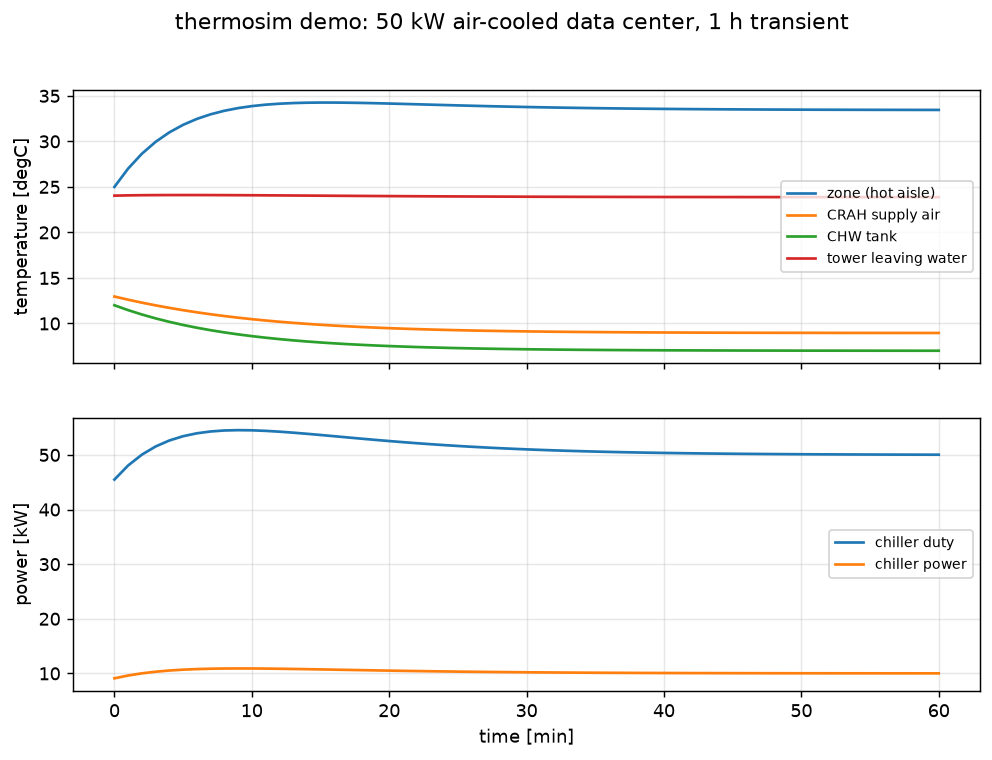
| Live results window | Time-series charts while the solver runs, probes on any component, A/B baseline overlay, scrubbing through time |
| Reports | Self-contained HTML facility report (print to PDF) and Word export: PUE, WUE, per-component energy, charts, scenario comparisons |
| Weather & schedules | EPW/TMY3 import, IT-load and ambient schedules, free-cooling feasibility counts |
| Analysis tools | Tornado sensitivity analysis, digital-twin calibration to measured BMS data, failure scenarios (pump/chiller trips, N+1, TES ride-through) |
| Extensibility | User-defined components built in the GUI, co-simulation with EES, MATLAB, Excel, or Python |
Try Datacenter Cooling before you buy
Download the free demo and check it against your own model — every product also has a 2-day free trial plan in the picker above, activated in minutes.
How does licensing work?
Pick a plan above, check out, and your license appears instantly under My Account → Software Licenses. Open the app’s Activation tab, copy your computer’s serial number into the license page, and your key is generated on the spot — timed plans start counting from activation, not from purchase, so buying ahead never wastes days. Renewing early always keeps your remaining days.
- Instant delivery — no waiting for a human to email keys
- Free trial available: one per customer, activates in minutes
- Changed computers? We reset your activation and you keep your remaining days
- Lifetime plans never expire and include updates to the same major version
Reviews
There are no reviews yet.