
TRNSYS optimization means letting an algorithm search your design space — collector areas, tank volumes, setpoints, flow rates — instead of sweeping it by hand. TRNSYS MO is the dedicated tool for it: multi-objective, truly parallel, and built around your existing deck.
What is TRNSYS MO?
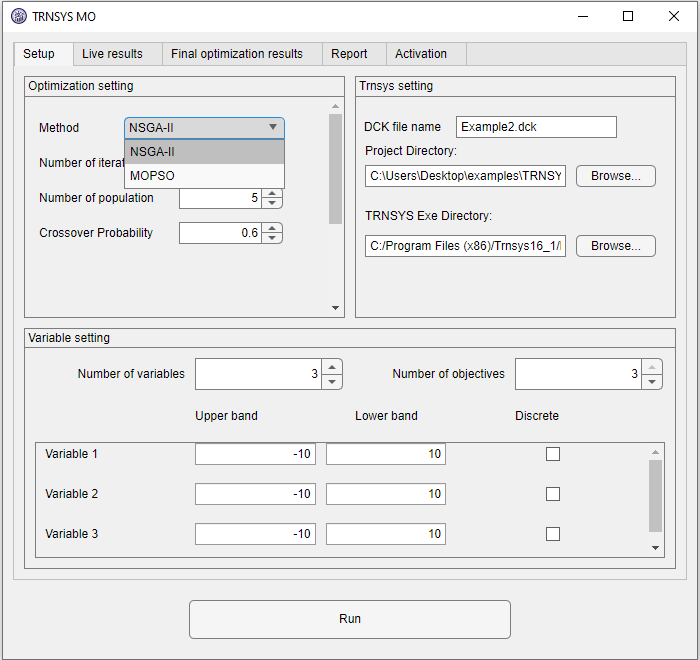
TRNSYS MO is a Windows desktop application that wraps any TRNSYS project in a multi-objective optimization loop. You point it at your project folder and deck file, mark which inputs are design variables with their bounds, tell it how many objectives your deck reports, pick one of ten algorithms, and press Run. The app generates candidate designs, runs TRNSYS itself on every CPU core, reads the objectives back, and evolves the population toward the Pareto front — plotted live while it runs.
How does parallel TRNSYS optimization work?
TRNSYS runs one simulation per TRNExe.exe process — so TRNSYS MO starts many of them. Each CPU core gets a private copy of your deck (yourdeck_core1.dck, _core2, …) and its own objectives file, so simultaneous simulations can never overwrite each other. The bundled Type 997 “Multi Optimization Parallel” writes objectives to a per-core file set by an environment variable — the file-collision problem that makes naive parallel TRNSYS runs fail is engineered away. Your master deck is never modified, and legacy projects built with Type 945/946 are converted automatically in the per-core copies. The result: with N cores, a study finishes close to N× faster whenever TRNSYS dominates the runtime.
Everything included
- 10 algorithms — NSGA-II, NSGA-III, U-NSGA-III, MOPSO, SPEA2, MOEA/D, AGE-MOEA, AGE-MOEA-II, SMS-EMOA, RVEA — switchable with one dropdown
- 1 to 99 objectives and up to 20 design variables, discrete (integer) variables included
- Live 2D/3D plotting with zoom, pan, and axis pickers — every simulation appears the moment it finishes
- Pareto quality metrics (spacing, mean ideal distance, maximum spread) and a suggested best design
- Unattended-run armor — failed simulations penalized, hung ones killed after a time limit, TRNSYS error dialogs auto-dismissed
- CSV reports — every design in
Total_Results.csv, the Pareto set inOptimized_Results.csv, written to your project folder - One-click type install — Type 997 and its Studio proforma installed from inside the app (with automatic elevation if Windows requires it)
Why use TRNSYS MO instead of GenOpt?
GenOpt is single-objective: it can minimize energy or cost, never both at once. Real design questions are trade-offs, and answering them with a single-objective tool means running it repeatedly with hand-tuned weights. TRNSYS MO searches the whole trade-off surface in one run, in parallel, with a GUI instead of hand-written configuration and template files.
| TRNSYS MO | GenOpt | |
|---|---|---|
| Objectives | 1–99 simultaneously, full Pareto front | Single objective only |
| Parallel simulations | Whole generations across all cores | Limited |
| Setup | GUI — point, tick, run | Hand-written .ini/.cfg/template files |
| Results | Live plots, Pareto metrics, CSV reports | Text output |
Common questions
Do I have to change my TRNSYS project?
No. Decks built with the legacy Type 945/946 run unchanged — the per-core copies are converted to Type 997 automatically. New projects drop the Type 997 component in from TRNSYS Studio like any other type.
Which TRNSYS versions are supported?
TRNSYS 16, 17, and 18 — anything that runs decks through TRNExe.exe. You need your own licensed TRNSYS installation; TRNSYS MO drives it.
What does a typical study look like?
A solar thermal system trading collector area against auxiliary energy and cost: 3 design variables, 2–3 objectives, a population of 40 evolved for 30 generations — 1,200 simulations. On 8 cores at 2 minutes per simulation that is an overnight run, not a week. More background in our guide to running TRNSYS simulations in parallel.
Try TRNSYS MO on your own model — free
Download the demo and see the workflow for yourself, or take a free 2-day trial license of the full edition — activated in minutes, no credit card charged.