
COMSOL’s parametric sweep shows you the design space; it doesn’t search it. COMSOL MO turns any COMSOL Multiphysics model into a true multi-objective optimization — driven from a desktop GUI, with zero scripting and no extra COMSOL module.
How does it work without touching the model?
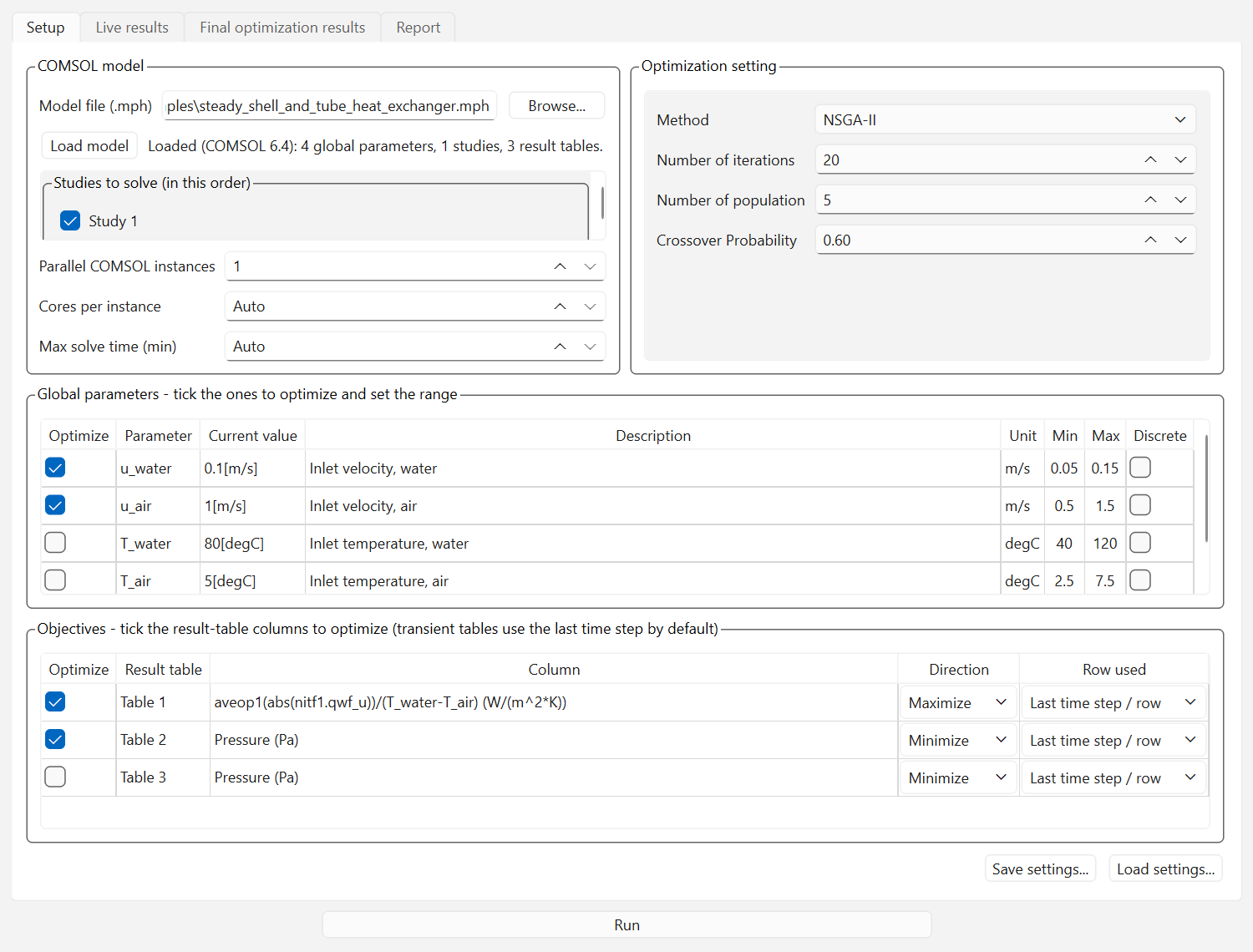
COMSOL MO reads your .mph file directly. Load the model and the app lists its global parameters, studies, and result tables (Derived Values / Global Evaluations). Tick the parameters to optimize and give each a min/max range; tick the table columns that are your objectives and choose Minimize or Maximize per objective; order the studies if your model chains them (an initialization study before the main solve — drag to reorder). Press Run. For each candidate design the app sets the parameters, solves the checked studies in order, re-evaluates the tables, and returns one number per objective to the optimizer.
Everything included
- 10 algorithms — NSGA-II, NSGA-III, U-NSGA-III, MOPSO, SPEA2, MOEA/D, AGE-MOEA, AGE-MOEA-II, SMS-EMOA, RVEA
- Any number of objectives, each independently minimized or maximized; discrete parameters supported; units preserved exactly as the model defines them
- Transient studies handled automatically — one row per time step, last step used by default (switchable)
- Multi-study chains — solve initialization and main studies in the order you choose
- Parallel COMSOL instances with per-instance core control — each instance solves a different design (COMSOL already parallelizes one solve internally, so 1–2 instances are usually the sweet spot)
- Crash-proof architecture — every COMSOL session lives in a separate worker process; a solver crash costs one penalized design, never the run
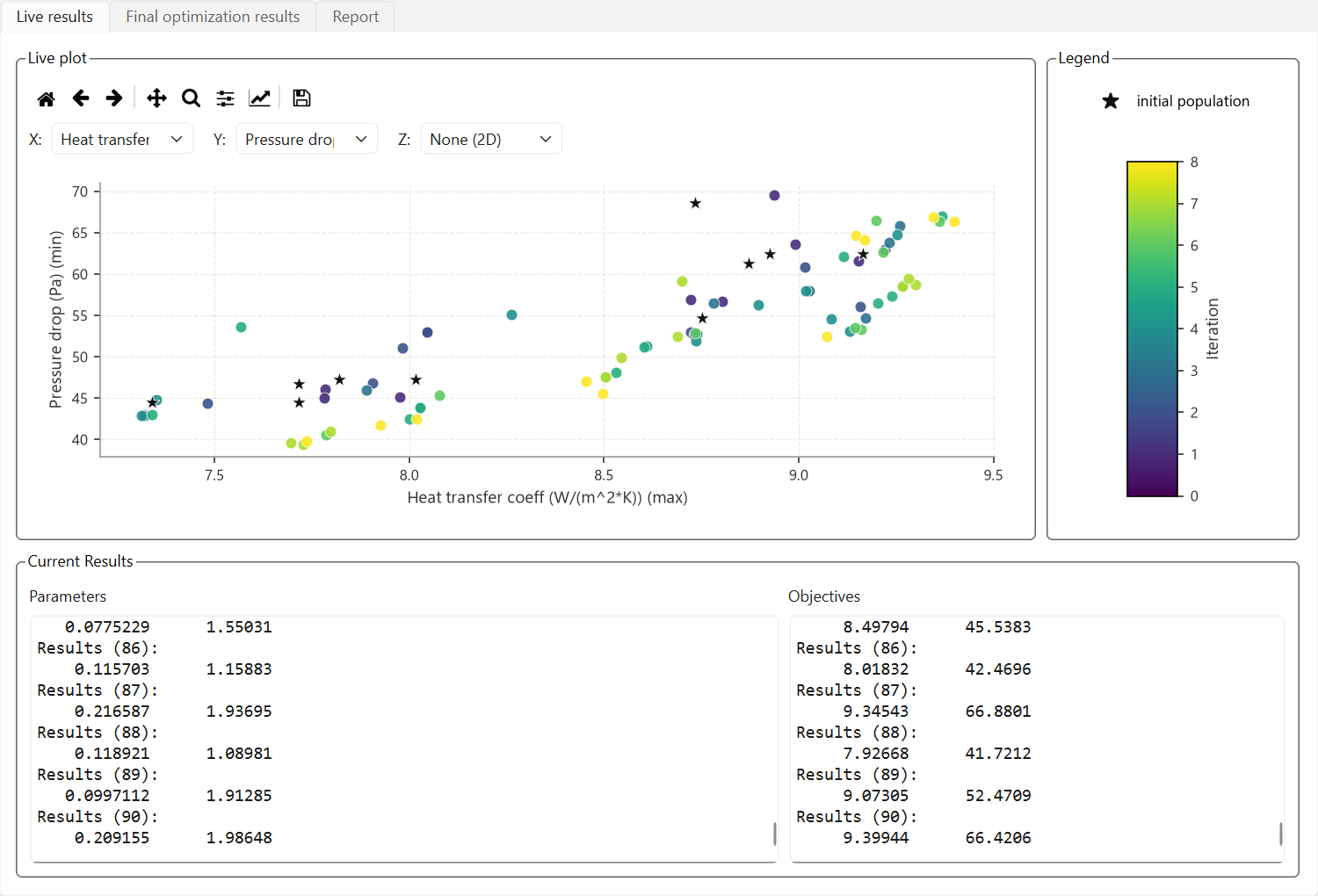
- Live results, Pareto front with suggested best design, CSV reports, settings save/load — plus per-instance COMSOL logs for debugging
- Illustrated 11-chapter manual from quick start to troubleshooting
How does it compare to the COMSOL Optimization Module?
| COMSOL MO | Optimization Module | |
|---|---|---|
| Multi-objective | Native: full Pareto front, per-objective min/max | Objectives combined into one scalar (sum/min/max) |
| Algorithms | 10 population-based methods (NSGA-II, MOPSO…) | Gradient and derivative-free single-objective methods |
| Setup | External GUI, zero model changes | Optimization study nodes configured in the model |
| Extra license | No add-on module needed | Separate paid module |
| Parallel designs | Several COMSOL instances, one design each | One optimization solver process |
The two are complementary: gradient-based shape optimization inside COMSOL is excellent when you have one smooth objective. When you need the trade-off surface between competing objectives — heat transfer vs pressure drop, mass vs stiffness — a population-based Pareto search is the right tool. Background: what multi-objective optimization is.
Common questions
Do I need LiveLink for MATLAB or Java programming?
No. COMSOL MO drives COMSOL’s own API internally — you never see it. If a parameter or result table exists in your model, it appears in the GUI; that is the whole setup.
What happens when a design doesn’t converge?
It is penalized and the run continues. Only if every design fails does the run abort with the last COMSOL error — which indicates a model-setup problem, and the per-instance logs show exactly what COMSOL reported.
Is there a version I can try without any license?
Yes — the trial edition is the full application capped at 10 iterations per run, installs side by side with the full product, and needs no activation. The free 2-day trial license unlocks the full edition.
Try COMSOL MO on your own model — free
Download the demo and see the workflow for yourself, or take a free 2-day trial license of the full edition — activated in minutes, no credit card charged. The demo edition runs full optimizations capped at 10 iterations — no activation needed.